
Télécharger Weather Map – Application météo Netatmo en temps réel gratuite pour Mac
Vue d'ensemble
Weather Map – Real time weather from Netatmo Stations is a sleek, free utility designed exclusively for macOS users who want instant, location‑specific weather data straight from their personal Netatmo weather stations. Developed by Imre Katai, the app belongs to the Lifestyle category with a subcategory of Weather, and it has been polished through several minor updates, the latest being version 1.1 released on 1 February 2017. The program runs on macOS X and earlier versions, offering an English‑language interface that blends seamlessly with the macOS look and feel.
Even though its install size isn’t publicly listed, the lightweight design ensures that the app starts up quickly and doesn’t hog system resources. Since its addition to the catalog in 2016, Weather Map has garnered a modest but dedicated user base, reflecting a niche appeal among Netatmo owners who prefer a native Mac experience over web‑based dashboards. The software delivers live temperature, humidity, CO₂ levels, and pressure readings, updating automatically as the Netatmo hardware reports new data.
Because it’s free, users can download, install, and start monitoring their indoor and outdoor climate without any hidden fees, making it an ideal companion for home automation enthusiasts, hobbyist meteorologists, and anyone who values accurate, real‑time environmental information on their Mac desktop.
Fonctionnalités clés et guide d'installation
Liste des fonctionnalités
- Synchronisation des données en temps réel avec les stations Netatmo intérieures et extérieures.
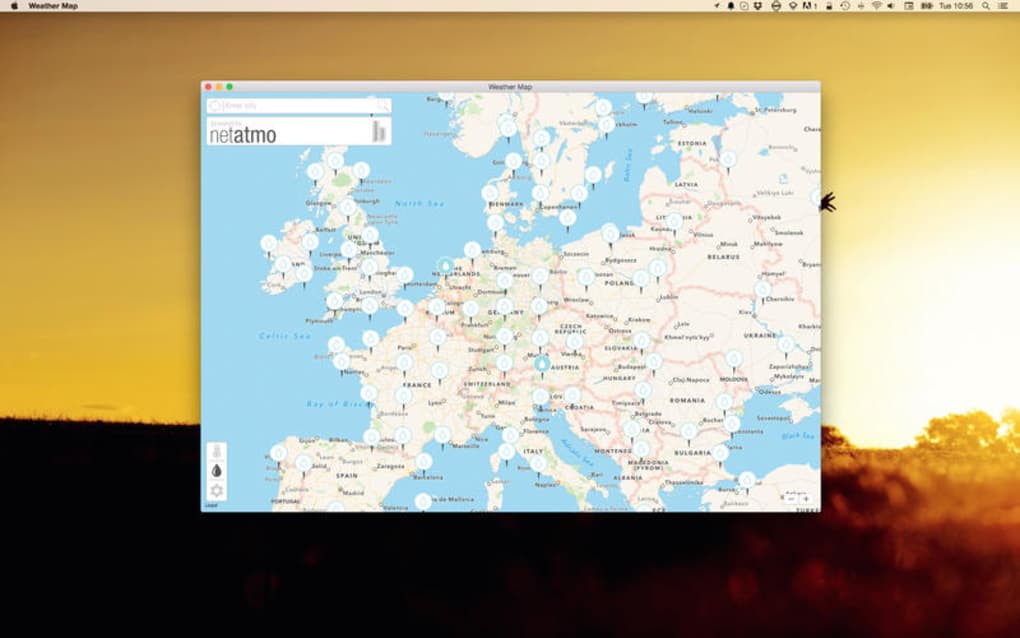
- Vue cartographique personnalisable affichant les relevés des stations sur une carte géographique.
- Prise en charge de plusieurs appareils Netatmo, permettant une comparaison côte à côte.
- Mises à jour automatiques en arrière-plan toutes les quelques minutes sans intervention de l'utilisateur.
- Interface minimaliste native macOS respectant les modes sombre et clair du système.
- Journaux CSV exportables pour l'analyse historique et l'intégration tierce.
- Téléchargement gratuit sans abonnement ni achats intégrés.
- Interface anglaise localisée avec icônes claires et infobulles d'aide.
Instructions d'installation et d'utilisation
Downloading and setting up Weather Map is straightforward, even for users who are new to macOS utilities. Follow these steps to get the app up and running:
- Download the installer: Click the “Download Weather Map” button on the official page. The file arrives as a compressed
.dmgpackage. - Mount the disk image: Double‑click the
.dmgfile. macOS will open a new window displaying the Weather Map icon and a shortcut to the Applications folder. - Copy to Applications: Drag the Weather Map icon onto the Applications shortcut. This copies the app to
/Applications, making it available for all users on the Mac. - Initial launch: Open the Applications folder and double‑click Weather Map. The first launch may trigger a security warning; click “Open” to proceed.
- Connect your Netatmo stations: In the app’s preferences, select “Add Station” and sign in with your Netatmo account credentials. The app will automatically discover any linked devices.
- Configure display options: Choose which data points (temperature, humidity, CO₂, pressure) appear on the map, set refresh intervals, and pick a preferred map style.
- Start monitoring: The main window now shows a live map with pins representing each station. Hover over a pin to see the latest readings; click for a detailed panel.
- Export data (optional): Use the “Export” button to save recent measurements as a CSV file for deeper analysis in spreadsheet software.
Because the app is free and lightweight, there are no hidden background services or mandatory registrations beyond the Netatmo account linkage. Updates are delivered via the built‑in updater, which checks for new versions each time the app launches, ensuring you always have the latest security patches and feature improvements.
Compatibilité, avantages et inconvénients
Support du système d'exploitation
Weather Map is compatible with macOS X and earlier releases, covering the majority of Macs still in active use. The application adheres to Apple’s sandboxing guidelines, meaning it runs securely alongside other native macOS software. Users on the latest macOS Ventura or Monterey can expect full functionality, while those on older versions (e.g., macOS Lion, Mountain Lion) may experience slight UI differences but retain core data‑sync capabilities.
Avantages
- Entièrement gratuit, sans frais cachés ni abonnement.
- Expérience native macOS s'intégrant parfaitement aux thèmes du système.
- Données météo en direct et précises provenant directement des stations Netatmo personnelles.
- Faible empreinte mémoire ; idéal pour les anciens matériels Mac.
- Processus d'installation simple et interface utilisateur intuitive.
- Export CSV pour analyses avancées ou automatisation tierce.
Inconvénients
- Limité à la langue anglaise ; aucun support multilingue pour le moment.
- Fonctionne uniquement avec le matériel Netatmo ; aucune compatibilité avec d'autres marques.
- Pas d'application mobile compagnon ; solution uniquement pour Mac.
- Taille d'installation non divulguée, ce qui peut inquiéter certains utilisateurs.
- La dernière mise à jour majeure date de 2017 ; la feuille de route future est incertaine.
Foire aux questions
Weather Map est‑il vraiment gratuit ?
Oui, l'application est entièrement gratuite à télécharger et à utiliser. Il n'y a aucun frais caché, aucun achat intégré ni abonnement.
Quels appareils Netatmo sont pris en charge ?
Weather Map fonctionne avec toutes les stations météo Netatmo intérieures et extérieures, y compris la Weather Station, la Weather Station Mini et les modules extérieurs associés.
Puis‑je exécuter Weather Map sur macOS Big Sur ?
Oui. L'application est pleinement compatible avec macOS Big Sur, Monterey, Ventura et les versions antérieures de macOS X. Elle s'adapte automatiquement aux modes clair et sombre du système.
À quelle fréquence l'application rafraîchit‑elle les données météo ?
Par défaut, Weather Map récupère de nouvelles mesures de vos stations Netatmo toutes les cinq minutes. Cet intervalle peut être personnalisé dans le panneau des préférences.
Mes données sont‑elles sécurisées lors de l'utilisation de Weather Map ?
L'application communique avec l'API chiffrée de Netatmo, garantissant que toutes les données météo sont transmises de manière sécurisée. Aucune donnée personnelle n'est stockée localement au-delà de ce qui est nécessaire pour l'interface.
Conclusion et appel à l'action
Weather Map delivers a focused, no‑cost solution for Mac users who own Netatmo stations and want a native desktop dashboard. Its real‑time synchronization, clean macOS‑centric design, and lightweight footprint make it an excellent addition to any home‑automation workflow. While the lack of multilingual support and the fact that development has slowed might be drawbacks for some, the core functionality remains solid and reliable. If you’re looking for a simple way to visualize your indoor and outdoor climate data without paying for a premium service, Weather Map is worth a download.
Prêt à voir vos données météo personnelles sur une belle carte ? Télécharger Weather Map maintenant et commencez à surveiller votre environnement instantanément.







